14.3 Basic Router Configuration Review
Этот раздел повторяет базовые router commands, которые уже встречались раньше, но здесь они важны как foundation для routing labs.
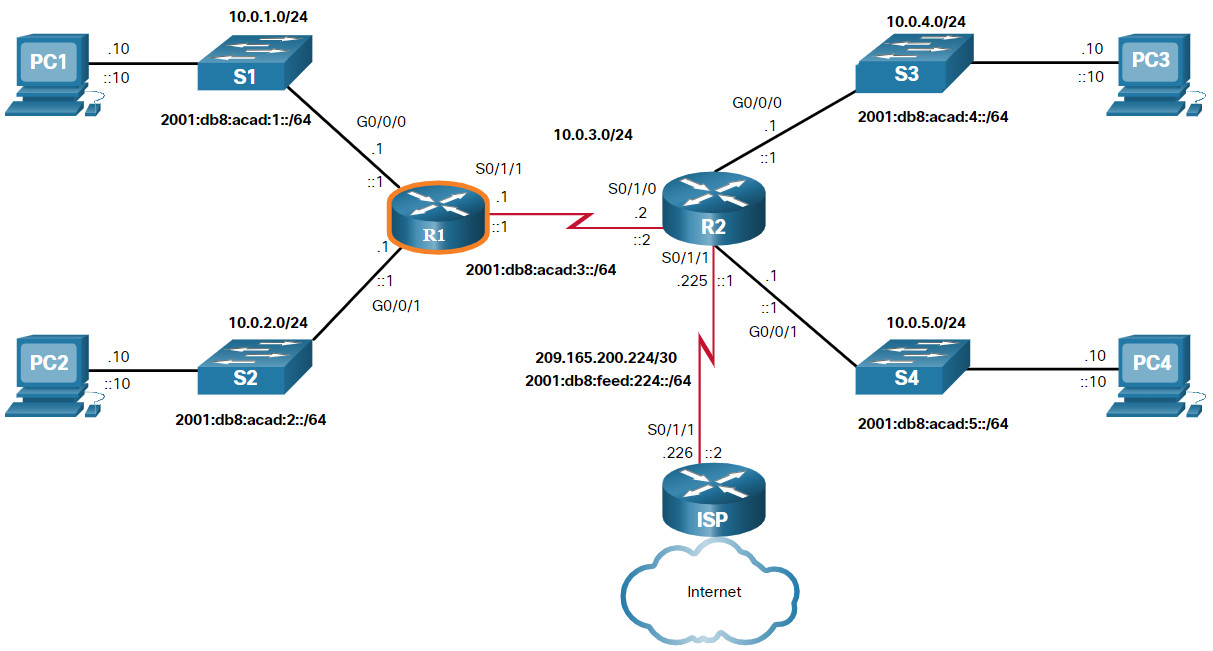
Configuration Commands
Типовой базовый набор:
hostname R1
no ip domain-lookup
enable secret class
service password-encryption
banner motd # Authorized Access Only #
line console 0
password cisco
login
line vty 0 4
password cisco
login
interface g0/0/0
ip address 192.168.10.1 255.255.255.0
no shutdown
interface g0/0/1
ipv6 address 2001:db8:acad:1::1/64
no shutdown
ipv6 unicast-routing
hostname R1 ciscoIOScommand
Задаёт имя router, которое видно в prompt.
no ip domain-lookup ciscoIOScommand
Отключает DNS lookup при ошибочно введённых командах.
enable secret class ciscoIOScommand
Задаёт encrypted password для privileged EXEC mode.
service password-encryption ciscoIOScommand
Шифрует line passwords в running-config.
banner motd # Authorized Access Only # ciscoIOScommand
Настраивает warning banner при входе на устройство.
line console 0 ciscoIOScommand
Переходит к настройке console line.
password cisco ciscoIOScommand
Задаёт password для line.
login ciscoIOScommand
Включает запрос password на line.
line vty 0 4 ciscoIOScommand
Переходит к настройке virtual terminal lines для remote access.
interface g0/0/0 ciscoIOScommand
Переходит в режим настройки конкретного interface.
ip address 192.168.10.1 255.255.255.0 ciscoIOScommand
Назначает IPv4 address и subnet mask interface.
ipv6 address 2001:db8:acad:1::1/64 ciscoIOScommand
Назначает IPv6 address interface.
no shutdown ciscoIOScommand
Административно включает interface.
ipv6 unicast-routing ciscoIOScommand
Включает IPv6 routing на router globally.
Verification Commands
show ip interface brief
show ipv6 interface brief
show running-config
show ip route
show ipv6 route
show protocols
show ip interface brief ciscoIOScommand
Кратко показывает IPv4 interfaces и их status.
show ipv6 interface brief ciscoIOScommand
Кратко показывает IPv6 addresses и status interfaces.
show running-config ciscoIOScommand
Показывает текущую активную конфигурацию.
show ip route ciscoIOScommand
Показывает IPv4 routing table.
show ipv6 route ciscoIOScommand
Показывает IPv6 routing table.
show protocols ciscoIOScommand
Показывает protocol-related information по interfaces, включая assigned addresses.
Filter Command Output
Очень полезно уметь не только смотреть output, но и фильтровать его.
show running-config | section interface
show ip route | begin Gateway
show ipv6 route | include C|L|S
show running-config | section interface ciscoIOScommand
Показывает только interface sections из running-config.
show ip route | begin Gateway ciscoIOScommand
Начинает вывод routing table с строки, где встречается Gateway.
show ipv6 route | include C|L|S ciscoIOScommand
Оставляет только строки, где встречаются указанные route codes.
Что реально важно уметь
Не просто ввести команду, а быстро понять: interface up/down, address assigned или нет, route есть или нет.
Если понял тему
Ты можешь базово настроить router, включить IPv4/IPv6 addressing и быстро проверить config и routing table через
showcommands.