4.2 Router-on-a-Stick Inter-VLAN Routing
4.2.1 Router-on-a-Stick Scenario
В этой topology router не стоит “между всеми VLANs” отдельными интерфейсами.
Вместо этого один router interface делится на subinterfaces.
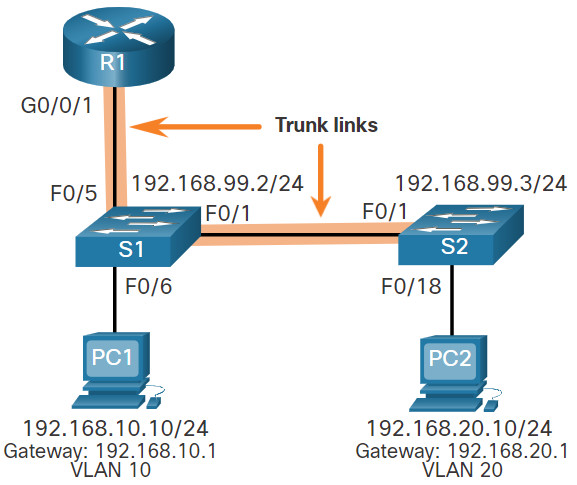
Пример:
| Subinterface | VLAN | IP Address |
|---|---|---|
G0/0/1.10 | 10 | 192.168.10.1/24 |
G0/0/1.20 | 20 | 192.168.20.1/24 |
G0/0/1.99 | 99 | 192.168.99.1/24 |
Здесь IP адрес subinterface обычно играет роль default gateway для соответствующей VLAN.
4.2.2 S1 VLAN and Trunking Configuration
На S1 нужно:
- создать VLANs;
- настроить management SVI;
- назначить access port;
- включить trunk ports.
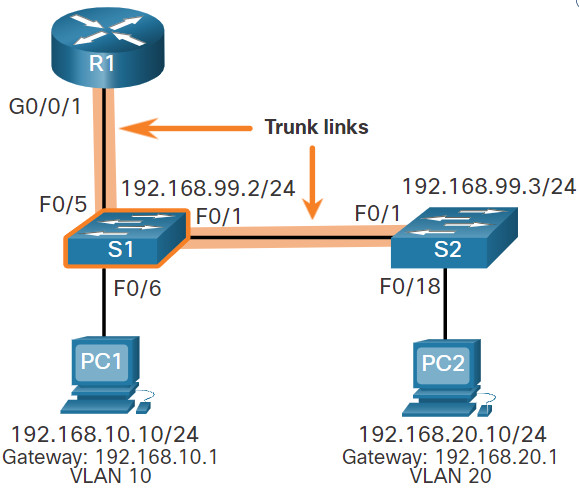
Пример команд:
S1(config)# vlan 10
S1(config-vlan)# name LAN10
S1(config-vlan)# exit
S1(config)# vlan 20
S1(config-vlan)# name LAN20
S1(config-vlan)# exit
S1(config)# vlan 99
S1(config-vlan)# name Management
S1(config-vlan)# exit

S1(config)# interface vlan 99
S1(config-if)# ip address 192.168.99.2 255.255.255.0
S1(config-if)# no shutdown
S1(config-if)# exit
S1(config)# ip default-gateway 192.168.99.1

S1(config)# interface fa0/6
S1(config-if)# switchport mode access
S1(config-if)# switchport access vlan 10
S1(config-if)# no shutdown

S1(config)# interface fa0/1
S1(config-if)# switchport mode trunk
S1(config-if)# no shutdown
S1(config)# interface fa0/5
S1(config-if)# switchport mode trunk
S1(config-if)# no shutdown
vlan 10 ciscoIOScommand
Создаёт VLAN 10.
name LAN10 ciscoIOScommand
Задаёт VLAN readable name.
interface vlan 99 ciscoIOScommand
Открывает SVI для VLAN 99.
ip address 192.168.99.2 255.255.255.0 ciscoIOScommand
Назначает IPv4 address SVI.
ip default-gateway 192.168.99.1 ciscoIOScommand
Задаёт management default gateway для Layer 2 switch.
switchport mode trunk ciscoIOScommand
Переводит port в trunk mode.
4.2.3 S2 VLAN and Trunking Configuration
На S2 логика почти такая же.
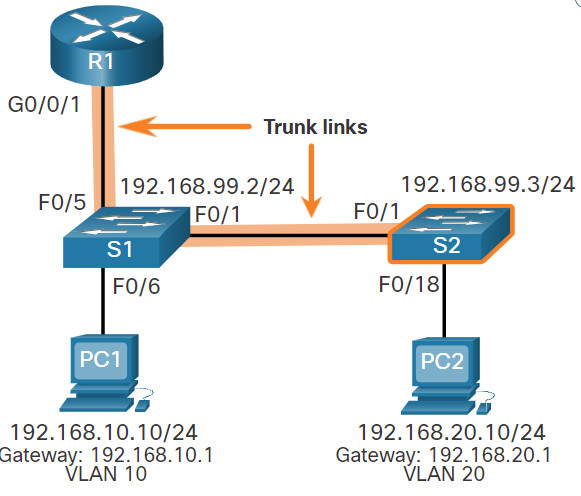
Нужно:
- создать те же VLANs;
- поднять management SVI;
- назначить access port для PC;
- включить trunk к
S1.
Это важный момент:
если VLAN topology растянута на несколько switches, VLANs и trunking должны быть согласованы между ними.
4.2.4 R1 Subinterface Configuration
Теперь самая важная часть метода.
Каждая routable VLAN получает свою subinterface.
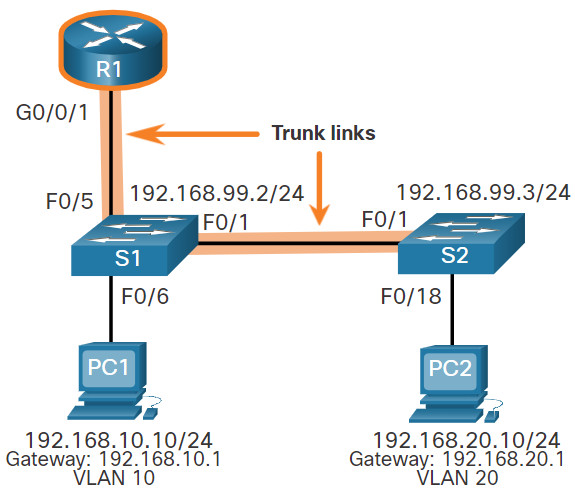
Пример:
R1(config)# interface G0/0/1.10
R1(config-subif)# description Default Gateway for VLAN 10
R1(config-subif)# encapsulation dot1Q 10
R1(config-subif)# ip address 192.168.10.1 255.255.255.0
R1(config-subif)# exit

R1(config)# interface G0/0/1.20
R1(config-subif)# description Default Gateway for VLAN 20
R1(config-subif)# encapsulation dot1Q 20
R1(config-subif)# ip address 192.168.20.1 255.255.255.0
R1(config-subif)# exit

R1(config)# interface G0/0/1.99
R1(config-subif)# description Default Gateway for VLAN 99
R1(config-subif)# encapsulation dot1Q 99
R1(config-subif)# ip address 192.168.99.1 255.255.255.0
R1(config-subif)# exit

R1(config)# interface G0/0/1
R1(config-if)# description Trunk link to S1
R1(config-if)# no shutdown
interface G0/0/1.10 ciscoIOScommand
Создаёт subinterface 10 на physical interface G0/0/1.
encapsulation dot1Q 10 ciscoIOScommand
Привязывает subinterface к VLAN 10 через 802.1Q tagging.
ip address 192.168.10.1 255.255.255.0 ciscoIOScommand
Назначает IP gateway для VLAN 10.
description Trunk link to S1 ciscoIOScommand
Добавляет понятную подпись интерфейсу.
Очень важное правило
Если physical interface выключен, то все subinterfaces тоже не будут работать.
4.2.5 Verify Connectivity Between PC1 and PC2
Проверка начинается с host side.
Сначала полезно убедиться, что host имеет:
- правильный IP;
- правильную subnet mask;
- правильный default gateway.
Команда на Windows host:
ipconfigipconfig networkterm
Показывает текущую IP configuration host.
Потом проверка:
ping 192.168.20.10ping ciscoIOScommand
Проверяет reachability между devices через ICMP.
4.2.6 Router-on-a-Stick Inter-VLAN Routing Verification
Для router полезны три команды:
show ip route
show ip interface brief
show interfaces g0/0/1.10
Для switch полезно:
show interfaces trunkshow ip route ciscoIOScommand
Показывает routing table и connected routes subinterfaces.
show ip interface brief ciscoIOScommand
Быстро показывает IP addresses и status interfaces.
show interfaces g0/0/1.10 ciscoIOScommand
Показывает детали конкретной subinterface, включая Encapsulation 802.1Q.
show interfaces trunk ciscoIOScommand
Показывает active trunk ports, allowed VLANs и native VLAN.
Что надо увидеть в нормальной конфигурации
- subinterfaces
up/up- connected routes для нужных VLANs
- trunk active on the switch
4.2.7 Packet Tracer – Configure Router-on-a-Stick Inter-VLAN Routing
Здесь ты обычно:
- проверяешь connectivity до конфигурации;
- создаёшь VLANs;
- поднимаешь trunk;
- настраиваешь subinterfaces;
- проверяешь ping between VLANs.
4.2.8 Lab – Configure Router-on-a-Stick Inter-VLAN Routing
Лабораторная закрепляет весь workflow:
- build topology;
- configure switches;
- configure trunk-based inter-VLAN routing;
- verify end-to-end connectivity.
Итог темы
Router-on-a-Stick = trunk + subinterfaces + one default gateway per VLAN